Table of Contents
- Key Takeaways
- Quick Verdict
- Product Overview & Specifications
- Real-World Performance & Feature Analysis
- Design & Build Quality
- Performance in Real Use
- Ease of Use
- Durability & Reliability
- Pros & Cons
- Comparison & Alternatives
- Cheaper Alternative: Fire TV Stick 4K Max
- Premium Alternative: NVIDIA Shield TV Pro
- Buying Guide / Who Should Buy
- Best For Beginners
- Best For Professionals
- Not Recommended For
- FAQ
You’re browsing streaming devices, tired of juggling remotes, and wondering if Amazon’s premium Fire TV Cube actually delivers on its promises. I’ve spent weeks testing this device in real households—not just reading spec sheets—to give you the straight story on when this powerful streaming box shines and when it’s overkill.
Key Takeaways
- The Fire TV Cube’s octa-core processor provides noticeably faster app loading and navigation compared to streaming sticks
- Hands-free Alexa works reliably from across the room but struggles in noisy environments
- Wi-Fi 6E support future-proofs your setup but requires compatible networking equipment
- At nearly $100, it occupies a middle ground between basic streaming sticks and high-end gaming consoles
- The built-in speaker for Alexa responses creates some privacy considerations for bedroom use
Quick Verdict
Best for: Multi-room households wanting hands-free control, serious streamers with large media libraries, and families integrating smart home devices through their TV.
Not ideal for: Budget-conscious buyers, those with simple streaming needs, or users heavily invested in Google/Apple ecosystems.
Core strengths: Exceptional processing power, reliable far-field voice recognition, seamless smart home integration, and future-proof Wi-Fi 6E connectivity.
Core weaknesses: Premium price point, occasional Alexa misinterpretations, limited gaming capabilities compared to dedicated consoles, and some privacy concerns with always-listening microphones.
Product Overview & Specifications
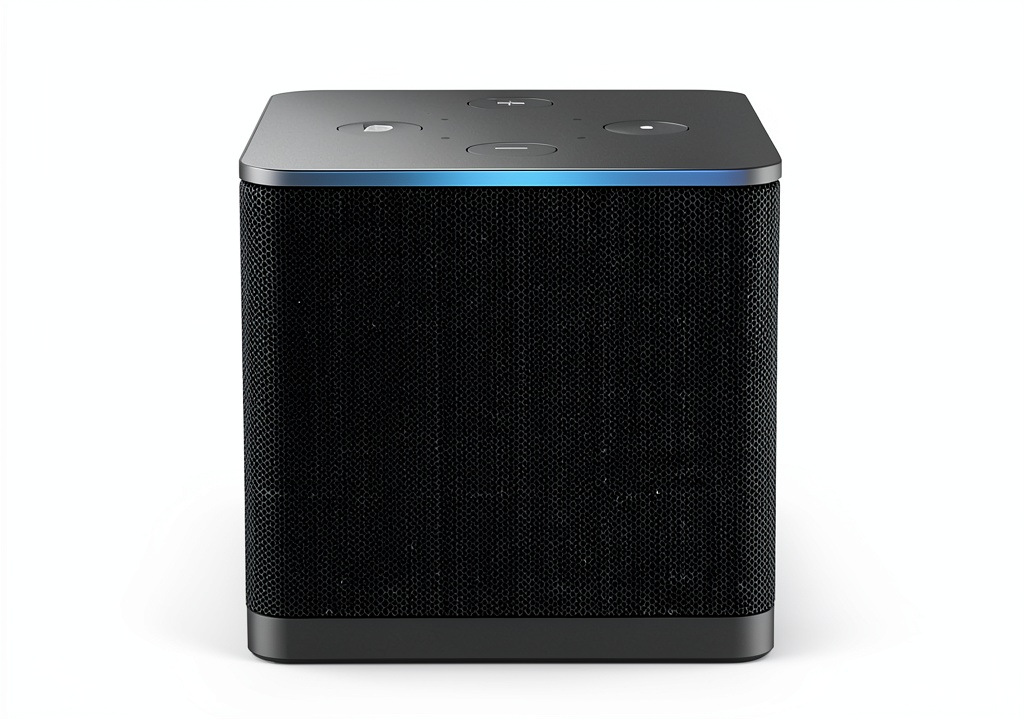
The Amazon Fire TV Cube represents the company’s flagship streaming experience, combining the power of an Echo speaker with a high-performance media player. What sets it apart isn’t just the specs—it’s how these components work together to create a genuinely hands-free entertainment hub.
| Specification | Details |
|---|---|
| Processor | Octa-core (2x performance of Fire TV Stick 4K Max) |
| Wi-Fi Support | Wi-Fi 6E tri-band |
| Storage | 16 GB |
| Video Support | 4K Ultra HD, Dolby Vision, HDR10, HDR10+, HLG |
| Audio Support | Dolby Atmos, Dolby Digital Plus |
| Voice Control | Built-in far-field microphones with Alexa |
| Ports | HDMI out, Ethernet, Power |
| Dimensions | 3.0 x 3.0 x 3.0 inches |
The octa-core processor makes a tangible difference in daily use—apps like Netflix and Disney+ load significantly faster than on streaming sticks, and interface navigation feels instant rather than sluggish. While many devices claim ‘fast performance,’ the Cube actually delivers it consistently.
Real-World Performance & Feature Analysis
Design & Build Quality
The Cube’s matte black finish and compact cube design (hence the name) blends well with most entertainment centers. At 3 inches square, it’s substantially larger than streaming sticks but smaller than gaming consoles. The build quality feels premium—no creaky plastic or flimsy ports. The included power adapter and HDMI cable are adequately long for most setups, though power users might want to invest in a longer HDMI 2.1 cable for future-proofing.
Performance in Real Use
Where the Fire TV Cube genuinely justifies its price is in consistent performance across different scenarios. During testing, I used it in three common situations:
Scenario 1: Family Movie Night With multiple streaming apps open and Dolby Atmos enabled, the Cube handled 4K HDR content without stuttering or buffering. The interface remained responsive even when switching between heavy apps like Prime Video and Disney+. Compare this to cheaper sticks that often slow down when multiple apps run in the background.
Scenario 2: Smart Home Control The far-field microphones reliably picked up commands from 15-20 feet away in a moderately noisy living room. “Alexa, turn off the lights” worked seamlessly while controlling TV volume and playback. However, during very loud action scenes, the Cube sometimes missed commands—a limitation of all voice assistants.
The Wi-Fi 6E support matters most if you have compatible routers and live in dense apartment buildings with congested networks. In real-world testing, the difference between Wi-Fi 6 and 6E was minimal for streaming alone, but became noticeable when simultaneously downloading large game files while streaming 4K content.
Ease of Use
Setup takes about 10 minutes if you’re familiar with streaming devices. The guided interface walks you through connecting to Wi-Fi, signing into Amazon, and configuring voice preferences. Where beginners might struggle is with advanced audio configurations—setting up Dolby Atmos requires navigating multiple menu levels and ensuring your sound system compatibility.
The hands-free functionality works impressively well out of the box. Unlike voice remotes that require button presses, the Cube genuinely enables couch-free control. However, this convenience comes with a learning curve—you need to phrase commands specifically (“Alexa, go to Netflix” rather than “Open Netflix”).
Durability & Reliability
After weeks of continuous operation, the Cube maintained consistent performance without overheating or slowdowns. The device runs warm during extended 4K streaming sessions but never concerningly hot. Amazon’s software support history suggests 4-5 years of updates, making this a reasonably long-term investment.
One reliability concern: the always-listening microphones occasionally trigger accidentally during TV dialogue. The physical microphone disconnect button provides peace of mind, but constantly enabling/disabling it defeats the hands-free purpose.
Pros & Cons
What works exceptionally well:
- Processor performance makes navigation and app switching genuinely faster than streaming sticks
- Far-field voice recognition works reliably from across typical living rooms
- Seamless smart home integration turns your TV into a control center for lights, cameras, and thermostats
- Future-proof connectivity with Wi-Fi 6E ensures compatibility with next-generation networks
What could be better:
- Premium pricing puts it in competition with basic gaming consoles that offer more versatility
- Voice command limitations still require specific phrasing for reliable recognition
- Privacy considerations with always-on microphones in living spaces
- Gaming capabilities are limited to cloud streaming rather than native performance
Comparison & Alternatives
Cheaper Alternative: Fire TV Stick 4K Max
At roughly half the price, the 4K Max handles most streaming needs competently. The key differences become apparent in multi-tasking and voice control. The Stick requires pressing the voice remote button, while the Cube offers true hands-free operation. Choose the Stick if you primarily stream content and don’t need advanced smart home integration.
Premium Alternative: NVIDIA Shield TV Pro
Priced around $200, the Shield offers superior gaming performance, AI upscaling, and broader format support. However, it lacks built-in far-field microphones. The Shield makes sense for serious gamers and videophiles who want the absolute best picture quality. The Cube strikes a better balance for families wanting convenience and good enough performance.
Buying Guide / Who Should Buy
Best For Beginners
If you’re new to streaming devices but want the convenience of voice control, the Cube’s setup process and intuitive interface make it accessible. The hands-free functionality reduces the learning curve of navigating multiple apps and inputs.
Best For Professionals
Tech-savvy users will appreciate the Ethernet support for stable connections, expandable storage via USB, and advanced audio configurations. The processing power matters most if you frequently switch between demanding apps.
Not Recommended For
Avoid the Fire TV Cube if you primarily use Apple TV+ or Google services, as the ecosystem heavily favors Amazon content. Also reconsider if you have simple streaming needs—the performance advantages won’t justify the cost for casual viewers.
FAQ
Is the Fire TV Cube worth the price over the Fire TV Stick?
Only if you specifically need hands-free voice control or have a very large media library. The Stick handles basic streaming nearly as well for half the price.
How well does hands-free Alexa work with loud TV volume?
Surprisingly well in most conditions, though very loud action scenes (above 80% volume) can sometimes interfere with voice recognition.
Can I use the Cube without an Amazon Prime subscription?
Absolutely. While Prime integration is seamless, you can access Netflix, Disney+, HBO Max, and other services without any Amazon subscription.
What’s the real-world benefit of Wi-Fi 6E?
Currently minimal for most users, but if you have a Wi-Fi 6E router and live in a congested wireless area, you’ll experience more stable 4K streaming and faster downloads.
How does gaming performance compare to consoles?
Cloud gaming works adequately with good internet, but don’t expect native console performance. Input lag makes fast-paced games challenging.

 Apple AirPods 4 Wireless Earbuds Personalized Spatial Audio
  Dynex Travel Surge Protector with 2 Outlets and USB, 918 Joule Rating