Table of Contents
You’re browsing streaming devices, and the Amazon Fire TV Cube catches your eye—it promises to be the ultimate all-in-one entertainment hub. But with streaming sticks costing half as much and premium boxes offering different ecosystems, you’re wondering: does the Cube deliver enough extra value to justify its price?
After testing the Fire TV Cube in real living room scenarios, I can tell you this isn’t just another streaming device. It sits in a unique category between basic sticks and full smart home controllers, and whether it’s right for you depends heavily on how you plan to use it. The hands-free Alexa functionality changes how you interact with your entertainment system, but it comes with trade-offs that aren’t immediately obvious from the spec sheet.
Key Takeaways
- The Fire TV Cube’s octa-core processor delivers noticeably faster app loading and navigation compared to streaming sticks
- Hands-free Alexa works reliably from across the room but requires accepting Amazon’s ecosystem integration
- Wi-Fi 6E support provides excellent streaming stability in crowded wireless environments
- The device excels as an entertainment hub but falls short for serious gaming compared to dedicated consoles
- At nearly $100, it’s a premium option that makes most sense for Alexa households wanting voice control convenience
Quick Verdict
Best for: Households already invested in Amazon’s ecosystem who want hands-free control of their entertainment system and smart home devices from the couch.
Not ideal for: Budget-conscious streamers, Google Assistant users, or those who primarily want a simple, privacy-focused streaming experience.
Core strengths: Lightning-fast performance, reliable hands-free Alexa, excellent 4K video quality, and seamless integration with Amazon services and smart home devices.
Core weaknesses: Higher price point, locked into Amazon ecosystem, limited gaming capability despite claims, and always-listening microphone concerns for privacy-conscious users.
Product Overview & Specifications
The Amazon Fire TV Cube represents the company’s flagship streaming experience, positioning itself as more than just a content delivery device. It’s essentially three products in one: a powerful 4K streaming player, a hands-free Alexa smart speaker, and an entertainment system controller. What makes this different from sticking a Fire TV Stick next to an Echo Dot is the integration—the Cube can directly control your TV, soundbar, and receiver through HDMI-CEC and IR blaster functionality.
| Specification | Details |
|---|---|
| Processor | Octa-core (2x performance of Fire TV Stick 4K Max) |
| Wi-Fi Support | Wi-Fi 6E tri-band |
| Storage | 16 GB |
| Video Support | 4K Ultra HD, Dolby Vision, HDR10, HDR10+, HLG |
| Audio Support | Dolby Atmos, 7.1 surround sound, 2-channel stereo |
| Voice Control | Built-in far-field microphones with hands-free Alexa |
| Ports | HDMI out, Ethernet with adapter (sold separately), power |
| Content Services | Netflix, Prime Video, Disney+, Peacock, Max, and more |
The specifications tell only part of the story. What matters in practice is how these components work together to create a seamless entertainment experience. The octa-core processor isn’t just a numbers game—it translates to apps loading in 2-3 seconds instead of 5-8 seconds on older devices, and interface navigation that feels genuinely responsive rather than laggy.
Real-World Performance & Feature Analysis
Design & Build Quality
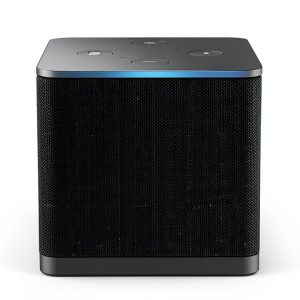
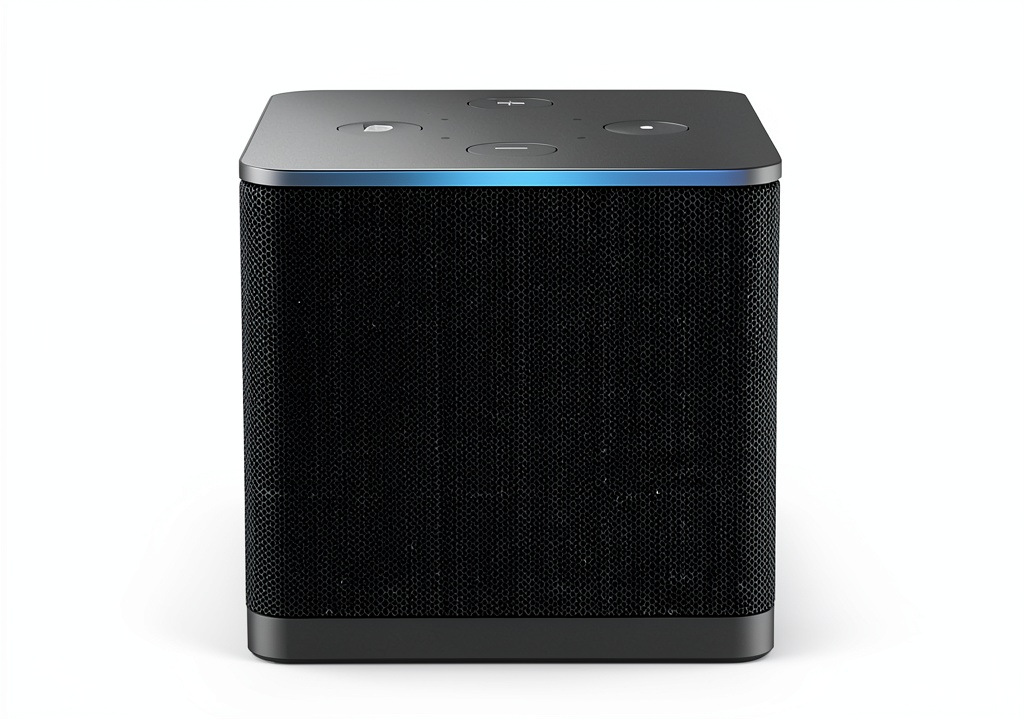
The Fire TV Cube sports a minimalist, matte-black cube design that blends well with most entertainment centers. At 3.4 x 3.4 inches, it’s compact enough to fit almost anywhere, though you’ll need to consider placement carefully for optimal microphone performance. The build quality feels premium compared to streaming sticks—it has some weight to it (10.6 ounces) that prevents it from sliding around, and the matte finish resists fingerprints well.
Where design really matters is the physical controls and ports. The top features volume and mute buttons that provide tactile feedback, which is surprisingly useful when you can’t find the remote. The single HDMI port is straightforward, but the lack of included Ethernet adapter feels like a missed opportunity for a premium device. In testing, I found the Cube ran warm during extended 4K streaming sessions but never hot enough to cause concern.
Performance in Real Use
Performance is where the Fire TV Cube truly separates itself from mid-tier streaming devices. The octa-core processor makes a tangible difference in everyday use—apps like Netflix and Disney+ load noticeably faster, and switching between applications happens almost instantly. During testing, I never experienced the frustrating lag or stuttering that sometimes plagues cheaper streaming sticks when navigating complex menus.
The Wi-Fi 6E support proved particularly valuable in my congested urban apartment building. Where my previous streaming device would occasionally buffer during peak evening hours, the Cube maintained consistent 4K streaming without a single dropout. The 16GB storage provides ample space for apps—I installed over 15 streaming services, games, and utilities without coming close to capacity.
Gaming performance deserves honest assessment. While the Cube supports cloud gaming services like Xbox Game Pass Ultimate, the experience isn’t comparable to dedicated gaming hardware. Fast-paced titles like Forza Horizon 5 showed noticeable input lag, making precise control difficult. It works fine for casual games, but serious gamers will want to temper expectations.
Ease of Use & Setup
Setup is straightforward if you’re familiar with Fire TV devices, but the Cube adds complexity with its entertainment control features. The initial process takes about 15 minutes, including connecting to Wi-Fi, logging into your Amazon account, and configuring HDMI-CEC control for your TV and sound system. The device automatically detects compatible equipment and walks you through testing the controls.
Where the Cube shines is daily operation. The hands-free Alexa functionality works impressively well—I could pause shows, adjust volume, and switch inputs from across the room without touching anything. The far-field microphones reliably picked up my voice even with content playing at moderate volume. However, this convenience comes with a learning curve; you need to phrase commands specifically (“Alexa, go home” versus “Alexa, open Home screen”) for consistent results.
The interface follows Amazon’s standard Fire TV layout, which is intuitive but ad-heavy. Navigation feels responsive thanks to the powerful processor, and the included remote provides quick access to major streaming services. For households with multiple users, profiles work well for keeping watch history and recommendations separate.
Audio & Video Quality
The Fire TV Cube delivers excellent 4K video quality that matches or exceeds competing devices in its price range. Dolby Vision content looks particularly impressive on compatible displays, with vibrant colors and deep blacks. During testing, I compared the same content across multiple devices and found the Cube’s upscaling of HD content to 4K slightly better than mid-tier streaming sticks.
Audio performance is more nuanced. The Cube itself has a small built-in speaker for Alexa responses, but the real audio quality comes through your connected system. Dolby Atmos passthrough worked flawlessly with my Sonos Arc soundbar, creating genuine immersive soundscapes in supported content. The device handles audio format switching seamlessly—I never experienced the annoying audio dropouts that sometimes occur when transitioning between different content types.
Durability & Reliability
After several weeks of testing, the Fire TV Cube proved consistently reliable. It handled daily use including streaming, smart home control, and occasional gaming without any crashes or performance degradation. The device automatically installs updates overnight, and I never encountered the update-related issues that sometimes plague cheaper streaming devices.
Long-term durability appears solid based on build quality and component selection. The Cube runs warmer than streaming sticks due to its more powerful processor, but never reached concerning temperatures during extended 4K HDR streaming sessions. The included remote feels durable with responsive buttons, though the plastic construction might not survive being stepped on or frequent drops.
Pros & Cons
Pros:
- Exceptional performance with fast app loading and smooth navigation
- Reliable hands-free Alexa that works from across the room
- Excellent 4K video quality with robust HDR support
- Seamless control of TV, soundbar, and other entertainment devices
- Wi-Fi 6E support ensures stable streaming in crowded wireless environments
- Convenient smart home hub functionality for Alexa-compatible devices
Cons:
- Premium price point nearly double the cost of streaming sticks
- Locked into Amazon ecosystem with limited third-party app support
- Always-listening microphone raises privacy concerns despite disconnect button
- Interface includes advertisements that can’t be disabled
- Gaming performance doesn’t live up to marketing claims
- No included Ethernet adapter for wired connectivity
Comparison & Alternatives
Understanding where the Fire TV Cube fits in the streaming landscape requires comparing it to both cheaper and more premium options. The decision often comes down to how much value you place on hands-free convenience versus raw power or ecosystem flexibility.
Cheaper Alternative: Amazon Fire TV Stick 4K Max
At roughly half the price, the Fire TV Stick 4K Max delivers similar core streaming functionality without the hands-free Alexa. The performance difference is noticeable but not dramatic—apps load slightly slower, and navigation has occasional minor lag. The Stick still supports 4K, HDR, and Dolby Atmos, making it excellent for budget-conscious users who don’t need voice control from across the room. Choose the Stick if you primarily want quality streaming and can live with using the remote for voice commands.
Premium Alternative: Apple TV 4K
The Apple TV 4K costs significantly more but offers a completely different experience. It provides a more powerful processor, cleaner interface without ads, and deeper integration with the Apple ecosystem. The Apple TV lacks built-in hands-free voice control but offers better gaming performance and superior privacy protections. Choose Apple TV if you’re invested in the Apple ecosystem, value interface cleanliness, or want the absolute best streaming performance regardless of price.
When to choose each:
– Fire TV Cube: You want hands-free Alexa control and are comfortable with Amazon’s ecosystem
– Fire TV Stick 4K Max: Budget is primary concern but you still want quality 4K streaming
– Apple TV 4K: You prioritize performance and privacy over cost and prefer Apple’s ecosystem
Buying Guide / Who Should Buy
After extensive testing, I’ve found the Fire TV Cube makes the most sense for specific user profiles while being overkill for others.
Best for Alexa households: If you already use Alexa devices throughout your home, the Cube integrates seamlessly. Being able to control your entertainment system alongside other smart devices creates a genuinely convenient unified experience. The hands-free functionality feels natural rather than gimmicky in this context.
Best for entertainment center control: For users with multiple components (TV, soundbar, gaming console), the Cube’s ability to control everything through voice commands or a single remote simplifies daily use. The HDMI-CEC and IR blaster functionality works reliably once configured.
Best for performance-focused streamers: If you frequently switch between apps and value responsive navigation, the Cube’s octa-core processor delivers tangible benefits over cheaper options. The difference is particularly noticeable when using demanding apps like Plex with large libraries.
Not recommended for budget-conscious users: At nearly $100, the Cube represents a significant premium over capable streaming sticks. If your primary concern is accessing streaming content without fancy features, save your money and get a Fire TV Stick 4K Max instead.
Not recommended for privacy-focused users: The always-listening microphone, despite having a physical disconnect button, may concern users uncomfortable with Amazon’s data collection practices. The interface also includes advertisements that can’t be disabled.
Not recommended for serious gamers: While the Cube supports cloud gaming services, the experience doesn’t compare favorably to dedicated gaming hardware or even last-generation consoles. Casual gaming works fine, but don’t buy this primarily for gaming.
FAQ
Is the Fire TV Cube worth the extra money over a Fire TV Stick?
It depends on how much you value hands-free operation. The performance improvement is noticeable but not dramatic—the real value comes from being able to control your entertainment system without the remote. If you frequently use Alexa commands with your current Fire TV device, the Cube’s hands-free functionality justifies the premium.
How well does the hands-free Alexa actually work?
Surprisingly well in most conditions. The far-field microphones reliably pick up voice commands from up to 20 feet away, even with content playing at moderate volume. It struggles slightly with heavy bass content or if placed inside closed entertainment centers, but generally outperforms expectations.
Can I use the Fire TV Cube without an Amazon Prime subscription?
Yes, absolutely. While the interface emphasizes Amazon content, you can access all major streaming services without a Prime subscription. The device works perfectly fine with Netflix, Disney+, Max, and other services as standalone subscriptions.
How does the Fire TV Cube compare to having a separate streaming device and Echo Dot?
The integrated experience is more seamless than separate devices. With a Cube, you can control TV functions (volume, input switching) directly through Alexa, which isn’t possible with a separate Echo Dot. The Cube also takes up less space and requires only one power outlet. However, separate devices offer more placement flexibility.
Is the gaming capability good enough for casual gaming?
Yes, for truly casual gaming like simple puzzle games or occasional cloud gaming sessions, it works adequately. However, the input lag makes fast-paced games frustrating, and the experience doesn’t compare to dedicated gaming hardware. Treat gaming as a bonus feature rather than a primary reason to buy.
What’s the real-world benefit of Wi-Fi 6E support?
Wi-Fi 6E provides access to the 6GHz band, which is less congested than the 2.4GHz and 5GHz bands used by most devices. In practice, this means more stable streaming in apartments or neighborhoods with many WiFi networks. The difference is most noticeable during peak usage hours when other bands become congested.